





lssdoc turns a LimeSurvey .lss export
into a polished Word (.docx) or PDF questionnaire document
for anyone working with a LimeSurvey survey: researchers, survey
methodologists, ethics committees, translators and reviewers. It renders
the questionnaire content side by side in up to four languages, runs an
automated integrity audit, and produces a layout that reads as a
published instrument – not a developer dump.
It also works the other way around. Write a questionnaire in a Word
form, or describe it in R, and lssdoc writes the .lss file
you import into LimeSurvey – so the people who design a questionnaire
never have to build it by hand in a web interface.
Two output templates:
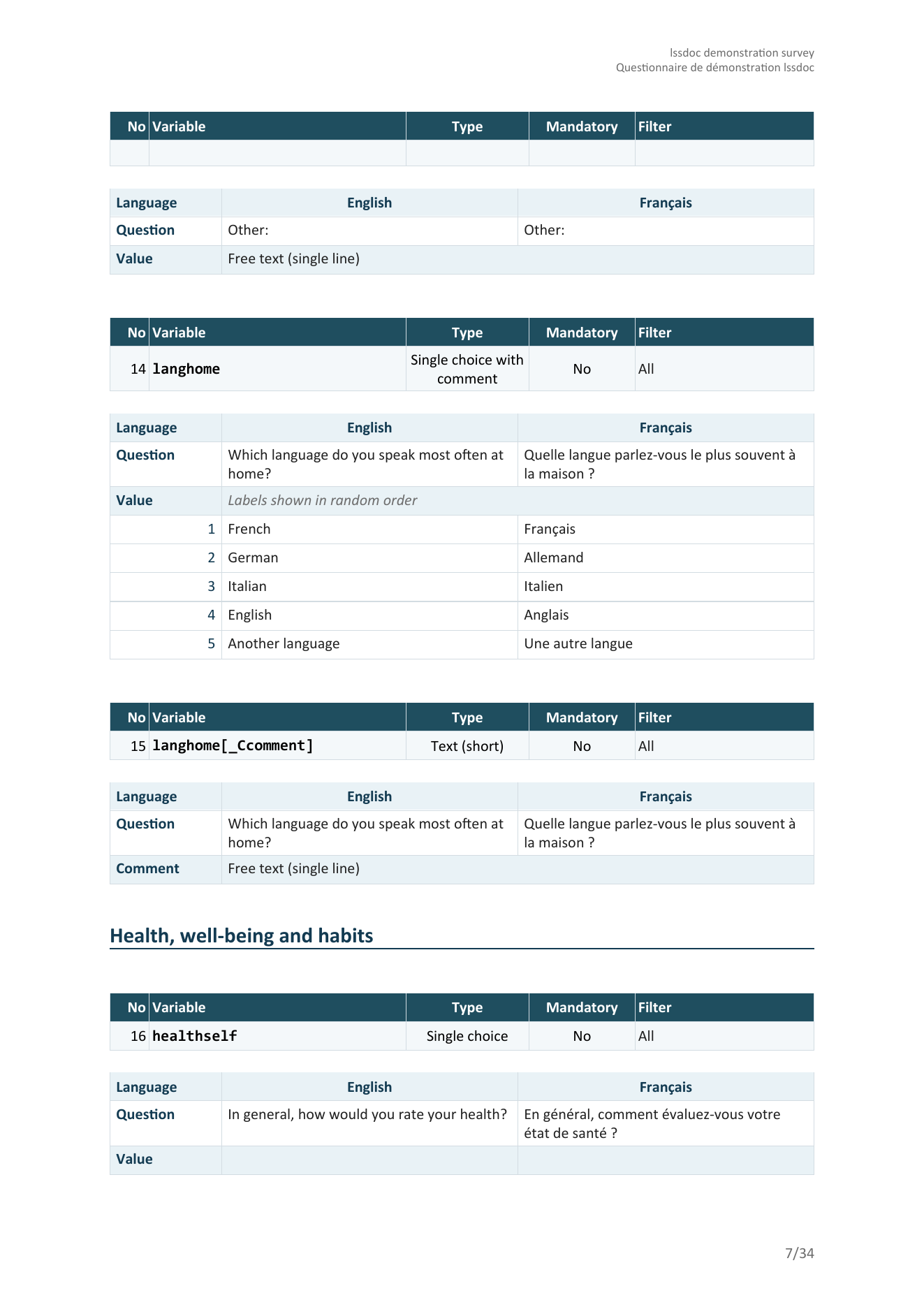
"cards" – one detached block per
item (meta table + question table), stacked vertically. Closest to the
printed questionnaire a respondent would see.
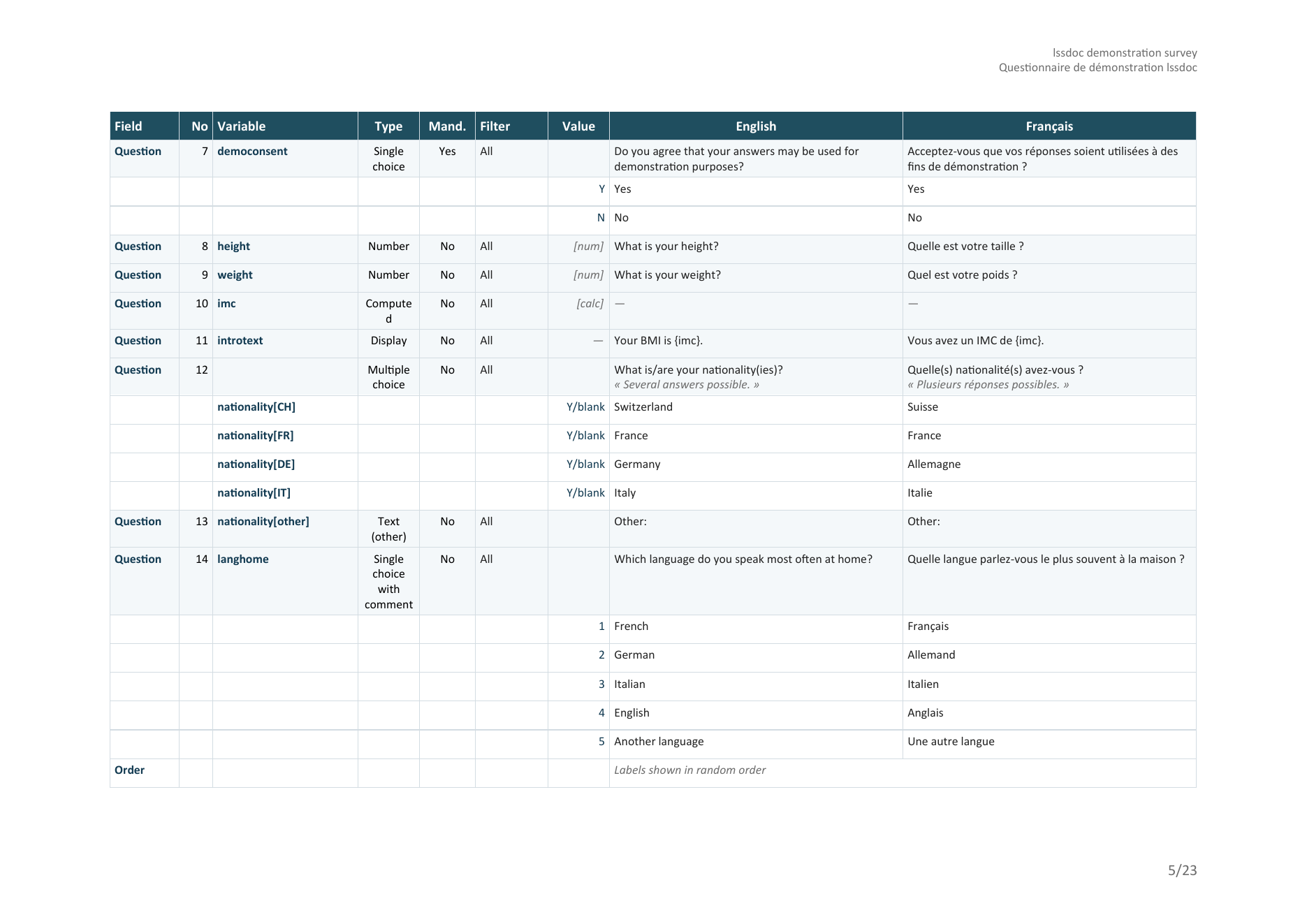
"table" – one dense table covering
the whole document: every variable is one tinted Question row
carrying its metadata, followed by one or more white Value rows
holding the answer codes and their labels per language. Group banners
(with their description, when present), welcome text, survey description
and end text become labelled rows of the same table so the document
reads as a single artifact.
Other things lssdoc takes care of for you:
parent[subq] /
parent[other], dual-scale arrays split into one block per
scale (parent[subq][1]), two-dimensional arrays as the row
x column cross-product (parent[row_col]), ranking expanded
into one column per position (parent[answerid]), and
list-with-comment into parent[_Ccomment]. Pass
variable_names = "underscore" for the Expression Manager /
SPSS / Stata code form (parent_subq) instead.Install the released version from CRAN:
install.packages("lssdoc")Or the latest build from R-universe (pre-built, no compiler needed):
install.packages(
  "lssdoc",
  repos = c("https://amaltawfik.r-universe.dev", "https://cloud.r-project.org")
)
Or the development version from GitHub, with pak:
# install.packages("pak")
pak::pak("amaltawfik/lssdoc")
Or with remotes:
# install.packages("remotes")
remotes::install_github("amaltawfik/lssdoc")
The package depends on officer and
flextable (declared as Suggests – the
parse and audit paths work without them).
Reading, auditing and rendering:
| Function | Role |
|---|---|
read_lss(file) |
Parse a .lss into a structured lss
object. |
audit_lss(input) |
Inspect a survey for anomalies; returns an lss_audit
object with a print() method. |
render_questionnaire(input, output, ...) |
Render the full questionnaire to a Word or PDF document. |
render_audit(input, output, ...) |
Render the audit findings alone to a Word or PDF document. |
Writing a questionnaire (experimental):
| Function | Role |
|---|---|
lss_template_docx(path, lang) |
Write a blank Word form to fill in. |
check_form_docx(path) |
Report every problem in a filled form, in one pass. |
read_form_docx(path) |
Read a filled form back into a specification. |
lss_spec(title, groups, ...) |
Describe a questionnaire directly in R instead. |
as_lss_spec(lss) |
Turn a survey read with read_lss() into a
specification. |
write_form_docx(x, path, lang) |
Render a specification, or an existing survey, as the form. |
write_lss(spec, file) |
Write a specification as an importable .lss file. |
audit_lss(), render_questionnaire() and
render_audit() accept input as either a path
to a .lss file or a pre-parsed lss object. The
output format for the two renderers is inferred from the extension of
output (.docx or .pdf).
library(lssdoc)

# Parse the .lss and render the Word document in a single call.
render_questionnaire("survey.lss", "review.docx")
The output uses the "cards" template by default, with
chrome_lang following the survey’s primary content
language. Open review.docx in Word, click
Yes when prompted to update fields (page numbers and
the table of contents).
render_questionnaire(
  "survey.lss",
  "review.docx",
  languages   = c("en", "fr"),
  template    = "table",
  chrome_lang = "en"
)
languages controls which content columns appear and in
which order; the first one is the primary language used for the table of
contents and group headings. chrome_lang is independent of
languages: keep chrome_lang = "en" to get
English column headers and row labels even if your survey content runs
in French and German – pass chrome_lang = "fr" (or
"de" / "es" / "it") when you want
the scaffolding to follow the content.
render_questionnaire(
  "survey.lss",
  "ethics_review.docx",
  languages              = c("en", "fr"),
  template               = "table",
  chrome_lang            = "en",
  show_privacy_settings  = TRUE,   # anonymized / save partial / IP / referrer / timestamp
  show_admin_settings    = TRUE,   # alias / end URL / active
  authors = list(
    list(name        = "Jane Doe",
         affiliation = "HESAV",
         orcid       = "0009-0001-2345-6789"),
    list(name        = "John Doe",
         affiliation = "HESAV",
         orcid       = "0009-0002-3456-7890")
  ),
  description = paste0(
    "Validated as part of the SNSF project XYZ. ",
    "Reference: https://example.org/projects/xyz"
  )
)
The cover page picks up the authors block (with clickable ORCID hyperlinks), the description (with URLs auto-detected and made clickable), and the privacy / admin settings rows in the metadata table.
render_questionnaire(
  "survey.lss",
  "minimal.docx",
  template         = "table",
  show_welcome     = FALSE,
  show_endtext     = FALSE,
  show_description = FALSE,
  show_groups      = FALSE,
  show_toc         = FALSE,
  show_audit       = FALSE,
  show_index       = FALSE
)
Pure data: one row per variable header, one row per value code, nothing else.
# Parse a single time, then audit and render different variants
# without re-reading the .lss.
lss   <- read_lss("survey.lss")
audit <- audit_lss(lss)
print(audit)  # console summary of flagged anomalies

render_questionnaire(lss, "review_en.docx", languages = "en")
render_questionnaire(lss, "review_fr.docx", languages = "fr")
render_audit(lss, "qa_followup.docx")A deliberately flawed survey ships with the package, so you can see
what audit_lss() catches without supplying your own
file:
demo <- system.file("extdata", "audit_demo.lss", package = "lssdoc")
audit_lss(read_lss(demo))
#> -- lssdoc audit ----------------------------------------------------
#> 12 findings: 5 errors, 7 warnings, 0 notes.
#> x Survey: duplicate question code 'age'
#> x Question 'age': filter references 'income', asked later (forward reference)
#> x Answer 'X': points to a question id that does not exist
#> x Subquestion 'orphan_sq': points to a question id that does not exist
#> x Question 'blank_q': text empty in every language
#> ! Question 'satisf': expects answer options, but none are defined
#> ! Question 'income': text missing in 'fr'
#> ! Question 'comment ': code carries whitespace
#> ... plus an empty group name, missing subquestions and an array-scale mismatch.# Same call, just pass a .pdf path. The package writes the .docx
# into a temp file and converts it locally via LibreOffice
# (must be installed and on PATH).
render_questionnaire("survey.lss", "review.pdf", template = "table")
render_audit("survey.lss", "qa.pdf")Many questionnaires are written by people who live in Word, not in R. Hand them a blank form, get it back filled in, and turn it into a LimeSurvey file.
# 1. a blank form, in the language of your choice
lss_template_docx("questionnaire.docx", lang = "fr")

# 2. the author fills it in, in Word

# 3. check it, then read it
check_form_docx("questionnaire.docx")   # every problem at once
spec <- read_form_docx("questionnaire.docx")

# 4. write the file to import into LimeSurvey
write_lss(spec, "questionnaire.lss")
The form is one small table per survey, group, question and quota, carrying the fields each question type needs with its defaults already filled in. Blank forms can also be downloaded from the website, so an author who does not use R never has to install anything.
An existing survey can enter the same loop:
write_form_docx() renders it as the form, so a
questionnaire can be exported from LimeSurvey, edited in Word and
re-imported. See vignette("write-in-word") for the
conventions, the question types and the filter syntax.
The rendered .docx uses an editorial petrol-blue palette
tuned for publication-grade output (#133B52 primary,
#3A7C8C accent, #E9F2F6 and
#F4F8FA for tinted bands, #D3DCE2 for the soft
grid). Calibri body / Consolas monospace by default; the
font and font_code arguments accept any string
to override.
Run citation("lssdoc") for the up-to-date citation, or
cite as:
Tawfik A (2026). _lssdoc: 'LimeSurvey' '.lss' Questionnaires to and
from Word Documents_. doi:10.32614/CRAN.package.lssdoc
<https://doi.org/10.32614/CRAN.package.lssdoc>. R package version
0.3.0, <https://CRAN.R-project.org/package=lssdoc>.MIT. See LICENSE for the full
notice.